Best Blog Plugins for WordPress in 2026: 9 Tools Compared
WLWPLegible EditorsLast verified 22 Nov 2026How we test12 min read
★ Short answer
Yoast SEO is the best first plugin for a WordPress blog: it runs on 10 million+ sites and is rated 4.8 out of 5 by 27,000+ users. Add Akismet to stop comment spam and UpdraftPlus for free scheduled backups to cloud storage.
How we make this list: we compare pricing pages, product documentation and public user reviews, then re-check every price before each update. No product paid for a place. Disclosure.
Yoast SEO is free and rated 4.8 out of 5 by more than 27,000 users. Premium costs $118.80 a year.
Akismet is free for personal blogs, but blogs with ads or affiliate links need a paid plan from $9.95 a month.
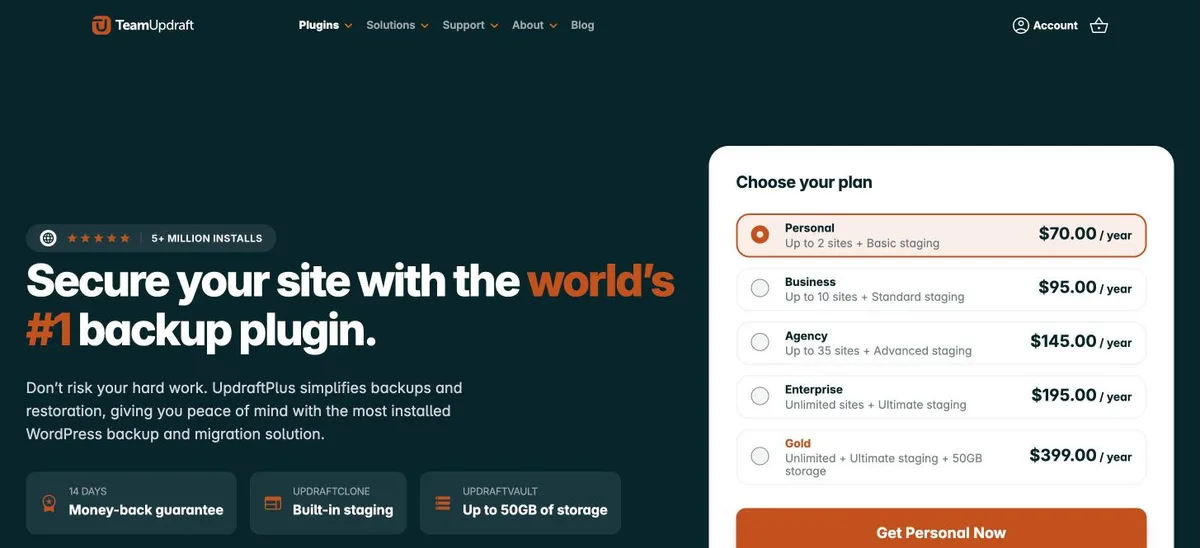
UpdraftPlus backs up to Google Drive, Dropbox or Amazon S3 for free. Premium starts at $70 a year for two sites.
Jetpack bundles stats, related posts and auto-sharing, but it has the lowest rating in this list at 3.7 out of 5.
All 9 plugins have a free version. Paid plans range from $39 to $348 a year at regular prices.
Which plugins a WordPress blog actually needs
A new blog needs fewer plugins than most lists suggest. Five jobs matter early: search visibility, spam control, backups, traffic stats and a way for readers to reach you.
Each extra plugin is more code to update. Our guide on how many plugins is too many explains why quality matters more than count.
Pick one plugin per job. Two SEO plugins or two stats plugins fight over the same settings and slow the admin down.
Later, add tools for long posts, such as a table of contents, and for content blocks like reviews and call-to-action boxes.
4.8/5on WordPress.org (27,821 reviews, checked Nov 2026)
Paid from$118.80/yr
Best SEO plugin for new blogs
Readability checkFree
XML sitemapsFree
Internal link suggestionsPremium
Paid planPremium, billed yearly
yoast.com
Yoast SEO homepage, captured Nov 2026.
Yoast SEO is an SEO plugin with more than 10 million active installs. The free version gives real-time SEO and readability feedback in the editor, schema markup, XML sitemaps, canonical URLs and an llms.txt file.
The trade off is that internal linking suggestions, a redirect manager and AI titles sit in Premium at $118.80 a year, which now also includes the old Local, News and Video add-ons. It suits new bloggers who want clear writing guidance.
What we like
Readability analysis helps new writers
Rated 4.8 out of 5 from 27,000+ ratings
Premium now bundles Local, News and Video SEO
Watch out for
Redirects and link suggestions need Premium
Premium costs more than Rank Math PRO
Premium adds link suggestions, redirects and AI titlesVisit yoast.com
02
Akismet Anti-spam
4.7/5on WordPress.org (1,186 reviews, checked Nov 2026)
Paid from$9.95/mo
Best for stopping comment spam
Comment spam filterYes
Form spam filterYes
Free usePersonal blogs only
Paid planPro, billed yearly
akismet.com
Akismet Anti-spam homepage, captured Nov 2026.
Akismet Anti-spam checks blog comments and contact form entries against a global spam database, with more than 5 million active installs. Personal blogs can use it on a name-your-price plan, and each comment keeps a status history for moderators.
The trade off is the licence. Blogs that run ads, affiliate links or sell anything count as commercial and need Pro at $9.95 a month billed yearly. It suits any blog with open comments, as long as you pick the right plan.
4.8/5on WordPress.org (8,737 reviews, checked Nov 2026)
Paid from$70/yr
Best free backup plugin for blogs
Free cloud storageDrive, Dropbox, S3 and more
Free schedulingEvery 2 hours to monthly
RestoreOne-click
Paid planPersonal, 2 sites
teamupdraft.com
UpdraftPlus homepage, captured Nov 2026.
UpdraftPlus is a backup plugin with more than 4 million active installs. The free version schedules backups from every 2 hours to monthly and sends them to Dropbox, Google Drive, Amazon S3, FTP or email.
The trade off is that UpdraftVault storage and site cloning come with Premium, which starts at $70 a year for two sites and includes 1GB of storage. It suits bloggers whose host has no daily backups, or who want a copy kept off the server.
3.7/5on WordPress.org (2,413 reviews, checked Nov 2026)
Paid from$29/mo
Best all-in-one toolkit for bloggers
Site statsBasic, free
Related postsFree
NewsletterFree subscriptions
Paid planPro, billed yearly
jetpack.com
Jetpack homepage, captured Nov 2026.
Jetpack bundles many blog tools in one plugin with more than 3 million active installs. Free features include basic site stats, related posts, auto-sharing to social networks, an image CDN and newsletter subscriptions.
The trade off is size and price. It is the lowest-rated plugin here at 3.7 out of 5, and the Pro bundle lists at $29 a month billed yearly, with half off the first year. It fits bloggers who want stats and sharing without separate plugins.
4.5/5on WordPress.org (3,161 reviews, checked Nov 2026)
Paid from$199/yr
Best for Google Analytics in the dashboard
Top posts reportFree
Referral sourcesFree
Popular posts widgetPlus
Paid planPlus, 1 site
monsterinsights.com
MonsterInsights homepage, captured Nov 2026.
MonsterInsights connects Google Analytics to WordPress and shows reports in your dashboard, with more than 2 million active installs. The free version covers an overview report, top posts and pages, top countries, referral sources and file download tracking.
The trade off is price. Plus lists at $199 a year for one site, with a 50% lower first year and renewals at full price. It adds a headline analyzer and popular posts tools. It suits bloggers who never open Google Analytics itself.
4.8/5on WordPress.org (14,395 reviews, checked Nov 2026)
Paid from$99/yr
Best contact form plugin for blogs
Contact formFree
Spam protectionBuilt in, plus CAPTCHA
File uploadsPaid
Paid planBasic, 1 site
wpforms.com
WPForms homepage, captured Nov 2026.
WPForms is a drag-and-drop form builder with more than 5 million active installs and a 4.8 rating from 14,000+ users. WPForms Lite includes templates, AI form generation, built-in spam protection, hCaptcha, reCAPTCHA and Turnstile, plus Stripe payments.
The trade off is that file uploads, multi-page forms and conditional logic need a paid plan. Basic lists at $99 a year for one site, with an intro price of $49.50. It suits bloggers who need a contact or pitch form that just works.
4.4/5on WordPress.org (221 reviews, checked Nov 2026)
Paid from$49/yr
Best for long-form posts
Automatic TOCFree
Sidebar widgetFree
Sticky TOCPro
Paid planPersonal, 1 site
tocwp.com
Easy Table of Contents homepage, captured Nov 2026.
Easy Table of Contents builds a clickable table of contents from the headings in your posts, on more than 600,000 sites. The free version adds it automatically, with nesting, counter styles, themes, a sidebar widget and a shortcode.
The trade off is that a sticky TOC, the Gutenberg block and read-time display are Pro features from $49 a year for one site. It suits blogs that publish long guides and tutorials. Our guide to adding a table of contents covers setup.
4.8/5on WordPress.org (7,529 reviews, checked Nov 2026)
Paid from$8.99/mo
Best free SEO alternative to Yoast
Redirect managerFree
Schema types16+ free
404 monitorFree
Paid planPRO, billed yearly
rankmath.com
Rank Math SEO homepage, captured Nov 2026.
Rank Math SEO is an SEO plugin with more than 4 million active installs. The free version includes a setup wizard, 16+ schema types, XML sitemaps, a redirect manager, a 404 monitor, breadcrumbs and a table of contents block.
The trade off is a busier interface with more settings to learn. PRO lists at $8.99 a month billed yearly for unlimited personal sites and adds rank tracking. It suits bloggers who want redirects and schema without paying.
4.9/5on WordPress.org (729 reviews, checked Nov 2026)
Paid from$39/yr
Best content blocks for bloggers
Review block with schemaFree
Click to tweetFree
Coupon blockPro
Paid planStarter, 1 site
ultimateblocks.com
Ultimate Blocks homepage, captured Nov 2026.
Ultimate Blocks is a block plugin made for bloggers, rated 4.9 out of 5. Free blocks include reviews with schema markup, HowTo schema, table of contents, call to action, social share, click to tweet, tabs and an image slider.
The trade off is that coupon and timeline blocks, plus a sticky table of contents, need Pro. Starter lists at $39 a year for one site. It suits review and affiliate bloggers who want richer posts without a page builder.
For a brand-new blog, start with an SEO plugin, Akismet, a backup plugin and a contact form. That covers the jobs that cause real trouble when missing.
Add analytics once you publish regularly. Our guide on measuring blog traffic shows which numbers to watch first.
Leave paid upgrades until a plugin limits something you use every week. Most blogs run for months on free versions alone.
How we chose
We grouped blog needs into SEO, spam, backups, stats, forms and long-form content, then picked well-rated plugins on WordPress.org for each job.
Prices come from each vendor's pricing page, checked on 22 November 2026. Ratings and install counts come from WordPress.org on the same day. Where a vendor shows a sale or intro price, the list shows the regular price.
We left out plugins not updated in the last 12 months. No vendor paid for a place, and we do not claim hands-on testing for this list.
How to choose plugins for a WordPress blog
Cover the essentials first, then add tools only when a real need shows up.
Pick one SEO plugin. Yoast SEO and Rank Math both work well. Do not run them together.
Protect comments and back up early. Akismet and UpdraftPlus take minutes to set up. Our backup guide shows how to test a restore.
Check your host before adding more. Many hosts include caching, backups or an image CDN. Skip plugins that repeat what the host already does.
Review the list every few months. Remove plugins you no longer use. Fewer plugins mean fewer updates and fewer conflicts.
FAQ
What is the best plugin for a WordPress blog?
Yoast SEO is the best first plugin for most blogs. It is free, runs on more than 10 million sites and checks both SEO and readability as you write. Add Akismet for spam and UpdraftPlus for backups next.
Is Akismet free for blogs?
Akismet is free for personal, non-commercial blogs on its name-your-price plan. If your blog runs ads, uses affiliate links, sells products or promotes a business, you need a paid plan, starting with Pro at $9.95 a month billed yearly.
How many plugins should a WordPress blog have?
There is no fixed number. A new blog usually runs well with five to ten plugins. What matters is that each one is well maintained and does a job you need.
Should I use Yoast SEO or Rank Math?
Both are rated 4.8 out of 5. Yoast is simpler and has strong readability checks. Rank Math puts redirects, a 404 monitor and more schema types in its free version. Choose one, not both.
Do I need Jetpack on my blog?
Not necessarily. Jetpack is handy if you want stats, related posts and social sharing in one plugin. If you only need one of those features, a single-purpose plugin is usually lighter.
Do I need a backup plugin if my host makes backups?
It is still a good idea. Host backups are usually stored on the same company's servers. A plugin like UpdraftPlus keeps a separate copy in your own cloud storage.