TouchRetouch is the best app to remove objects from photos, rated 4.7 out of 5 on the App Store from about 59,000 ratings, with yearly plans from $14.99. Pick Photoshop for complex rebuilds and Lightroom if you already manage a photo library.
How we make this list: we compare pricing pages, product documentation and public user reviews, then re-check every price before each update. No product paid for a place. Disclosure.
TouchRetouch is the most focused pick: a dedicated remover rated 4.7 out of 5 on the App Store from about 59,000 ratings, with yearly plans from $14.99.
Photoshop has the strongest rebuild quality, rated 4.6 out of 5 on G2 from more than 13,000 reviews, but the cheapest entry is $19.99 a month.
Lightroom's Generative Remove suits photographers who already keep a library there, at $9.99 a month on the Photography plan.
Adobe Express and Pixlr remove objects on free plans; Pixlr Plus is the cheapest paid plan in the list at $2.49 a month.
PicWish scores 4.8 out of 5 on G2, but from only 6 reviews, the thinnest rating signal in this list.
What to look for in an object removal app
Most object removers work the same way: paint over the unwanted thing and the app fills the gap with what it guesses was behind it. The differences are how well the fill holds up on busy textures, whether you can fix it by hand, and what the export costs.
Free plans vary more than prices do. Some remove objects free and let you download the full-size result, while others only show a preview or limit AI credits. Check the export before you build a workflow around a free plan.
A dedicated app does one job well. TouchRetouch is built only for removal, while the general editors in this list add it beside design, library or batch tools. Our guide on adding a logo in WordPress covers the other half of a tidy image: consistent branding on every photo.
Subscriptions hide the real cost when removal is priced per month. A $9.99 monthly plan sounds cheap until you only remove objects a few times a year. Work out how often you edit photos first, then compare the yearly cost.
TouchRetouch is a single-purpose app for removing unwanted objects, people, wires and blemishes from photos on iOS and Android. It offers a brush tool, line removal for power cables, a clone stamp for manual fixes and an AI erase mode, and it is rated 4.7 out of 5 on the App Store from about 59,000 ratings.
The trade off is that it does only one job. There is no general photo editing, no desktop app and no batch mode, and the full removal tools need a paid plan, with yearly plans listed from $14.99 to $49.99. It suits anyone who mainly wants clean phone photos without a subscription to a full editor.
What we like
Built only for object removal, so the tools are focused
Adobe Photoshop is the industry-standard image editor, and its Remove tool and Generative Fill rebuild the area behind a removed object. It works in layers with masks, so you can repair the result by hand when the AI fill misses, and it is rated 4.6 out of 5 on G2 from more than 13,000 reviews.
The trade off is price and weight. The cheapest way in is the Photography plan at $19.99 a month, which also includes Lightroom, while Photoshop alone costs $22.99 a month billed yearly. It suits photographers and designers who need full control over difficult removals.
Adobe Lightroom is a photo manager and editor whose Generative Remove erases tourists, wires and reflections and fills the gap to match light and depth. It pairs removal with RAW editing, AI masking and cloud sync across phone and desktop, and it is rated 4.6 out of 5 on G2 from about 3,300 reviews.
The trade off is that Generative Remove needs a paid plan. The free mobile tier covers basic edits only, and the Photography plan costs $9.99 a month, while the mobile-only Premium plan is listed at $4.99 a month. It suits photographers who already organise and edit their photos in Lightroom.
What we like
Generative Remove works well on simple backgrounds
RAW editing and library tools in one app
Syncs edits across phone and desktop
Watch out for
Removal needs a paid plan
Struggles on busy textures compared with Photoshop
Canva is a design platform whose Magic Eraser brushes away unwanted objects and people, then lets you keep designing in the same file. It is rated 4.7 out of 5 on G2 from more than 7,700 reviews, and Pro also adds background removal, Magic Edit and 1TB of storage.
The trade off is that Magic Eraser is a Pro feature. The free plan covers design, templates and basic photo edits, but object removal needs Pro at $144 a year. It suits people who already make social posts, flyers and presentations in Canva.
What we like
Removal sits inside a full design workspace
Highest G2 rating in this list with 7,700+ reviews
Easy brush interface for beginners
Watch out for
Magic Eraser needs the Pro plan
No dedicated line or wire removal
Exports depend on the design canvas size
Pro adds Magic Eraser, Magic Edit and 1TB storageVisit canva.com
05
Adobe Express
4.4/5on G2 (1,108 reviews, checked Nov 2026)
Paid from$9.99/mo
Best free removal for quick social edits
Object removalRemove object tool
Free planYes, removal included
PlatformsWeb, iOS, Android
Paid planPremium, $9.99/mo
adobe.com
Adobe Express homepage, captured Nov 2026.
Adobe Express is a quick design app with a remove-object tool that erases distractions free with no watermark on the download. It also covers background removal, templates and social-size exports, and it is rated 4.4 out of 5 on G2 from more than 1,100 reviews.
The trade off is depth. It handles simple removals well but lacks the manual repair tools of Photoshop, and Premium at $9.99 a month adds more templates, fonts and 100GB of storage. It suits anyone who wants a fast free fix before posting a photo.
Picsart is a mobile-first photo editor with an AI Remove tool for erasing objects, people and blemishes, plus stickers, filters and collage tools. It is rated 4.5 out of 5 on G2 from 740 reviews, and the free plan covers basic edits and the sticker library.
The trade off is that advanced removal sits behind Pro. The web Pro plan costs $10.50 a month billed yearly, while the iOS Gold plan is priced differently at $12.99 a month. It suits phone users who want removal plus playful edits in one app.
Pixlr is a browser-based editor with Generative Fill and an AI object remover, plus layers, filters and batch tools. It is rated 4.4 out of 5 on G2 from 750 reviews, and the free plan covers basic edits with ads.
The trade off is polish. The interface is busy, free exports carry ads in the workflow, and the cheapest paid plan, Plus, costs $2.49 a month. It suits anyone who wants the lowest paid price for web-based object removal.
Fotor is a web editor with an AI Object Remover that clears people, text and clutter, plus batch editing, templates and a design maker. It is rated 4.2 out of 5 on G2 from 342 reviews, and the free plan covers basic edits and the remover with limits.
The trade off is that the free plan limits exports and AI credits. Pro costs $8.99 a month and adds batch work, high-resolution exports and more AI tools. It suits small sellers and bloggers who clean up lots of photos at once.
What we like
AI remover plus batch editing
Templates and design tools included
Simple one-click workflow
Watch out for
Free plan limits AI credits and exports
Lowest G2 rating in this list
Pro is needed for high-resolution exports
Pro adds batch editing and high-resolution exportsVisit fotor.com
09
PhotoRoom
4.3/5on G2 (20 reviews, checked Nov 2026)
Paid from$7.50/mo
Best for product photos and batch cleanup
Object removalRetouch tool
Free planYes, personal use
PlatformsWeb, iOS, Android
Paid planPro, $7.50/mo billed yearly
photoroom.com
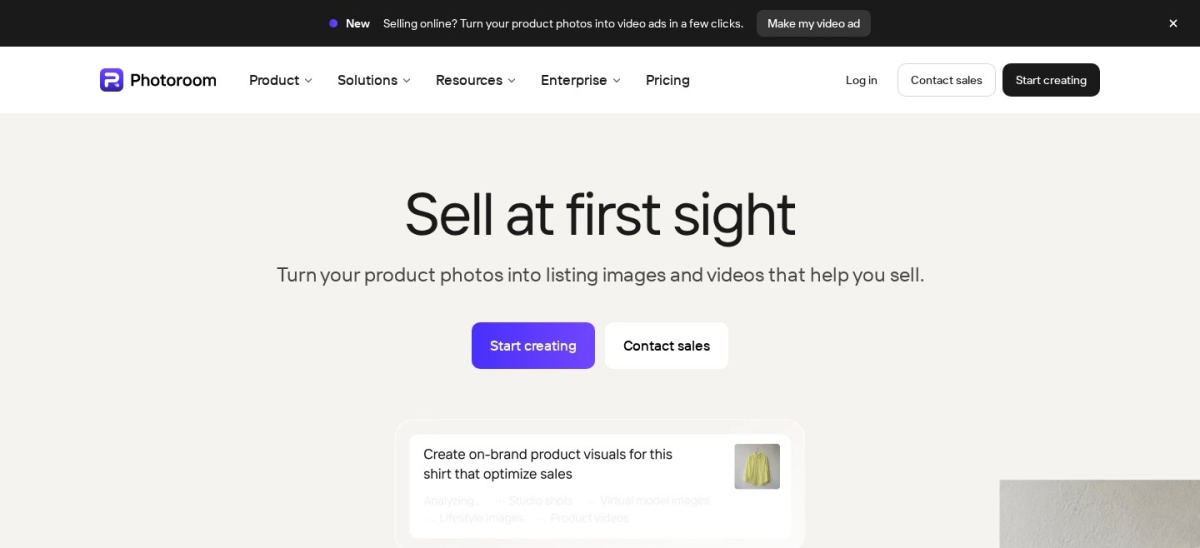
PhotoRoom homepage, captured Nov 2026.
PhotoRoom is built for product photos, and its Retouch tool removes unwanted objects while its background tools clean up the rest of the shot. It is rated 4.3 out of 5 on G2 from 20 reviews, and Pro costs $7.50 a month billed yearly with 1,000 exports a month.
The trade off is scope. It is tuned for product shots, not for large landscape repairs, and the free plan is for personal, non-commercial use. It suits sellers who clean up product photos in batches.
PicWish is a web AI toolkit whose Retouch tool removes objects, people and text, alongside background removal, upscaling and enhancement. It is rated 4.8 out of 5 on G2, though from only 6 reviews, and Pro costs $59.99 a year.
The trade off is the thin rating signal. Six G2 reviews is the smallest base in this list, and the free plan limits credits, so heavy users need Pro. It suits occasional web users who want several AI photo tools in one place.
Free plans cover one-off removals well. Adobe Express removes objects free with no watermark, and TouchRetouch lets you download the app free.
Paid plans mostly add volume and repair. You get more AI credits, high-resolution exports, batch work and manual tools such as clone stamp and layers.
If you clean up photos a few times a month, a paid plan usually costs less per edit than buying credits one by one. Work out your monthly count before you pay.
How we chose
We started from the apps people search for when they want objects gone: dedicated removers such as TouchRetouch and Cleanup.pictures, plus the removal tools inside Photoshop, Lightroom, Canva and other editors.
Prices come from each vendor's pricing page and App Store listing, checked on 25 November 2026. Ratings come from G2 on the same day, except TouchRetouch, which is rated on the App Store. Where a vendor shows a sale, the list shows the regular price.
We left out tools with no public rating, including Cleanup.pictures and Slazzer. No vendor paid for a place, and we do not claim to have used these tools ourselves.
How to choose an app to remove objects from photos
Start with how often you remove objects, then match the tool to the photos you edit most.
Decide if you need a specialist or an editor. If removal is the whole job, a focused app is faster. If you also edit, design or organise photos, pick an editor with removal built in.
Check what the free plan really exports. Some free plans cap resolution or AI credits, so a removal that looks fine on screen may export small. Test one photo end to end before you commit.
Match the tool to your device. TouchRetouch, Picsart and Lightroom work well on a phone, while Photoshop and Pixlr suit desktop work. Pick the one you will actually open.
Compare the yearly cost, not the monthly teaser. Weekly and monthly prices add up fast. A $9.99 weekly plan costs more than $500 over a year, so read the yearly figure before you commit.
FAQ
What is the best app to remove objects from photos?
TouchRetouch is the best pick for most people. It is built only for removal, rated 4.7 out of 5 on the App Store from about 59,000 ratings, and yearly plans start at $14.99. Photoshop is the stronger choice for complex rebuilds.
Can I remove objects from photos for free?
Yes. Adobe Express removes objects free with no watermark, and Pixlr and Fotor offer free removal with limits. Canva's Magic Eraser needs Pro, and TouchRetouch's full tools need a paid plan, so check the free plan before you rely on it.
Which app is best for removing people from photos?
TouchRetouch is the quickest for people and wires on a phone, while Photoshop's Generative Fill handles large crowds and busy backgrounds best. Lightroom's Generative Remove is a good middle ground if you already keep your photos there.
Does Photoshop remove objects better than free apps?
Yes, on difficult photos. Photoshop rebuilds complex textures with layers and masks you can repair by hand, while free apps work best on simple backgrounds such as sky, walls and grass. For a quick fix on a simple scene, a free app is often enough.
Is TouchRetouch really free?
The app is free to download, but the full removal tools need a paid plan. Yearly plans are listed from $14.99 to $49.99, and weekly plans cost $9.99, which adds up fast. Pick the yearly plan if you edit photos often.
Which app is best for product photos?
PhotoRoom is the best pick for product photos. Its Retouch tool removes unwanted objects, it handles batch work, and Pro costs $7.50 a month billed yearly with 1,000 exports a month. The free plan is for personal use only.
SaaS SEO and WordPress specialist with about 8 years of experience. Rakib compares WordPress plugins, themes, hosting and software using public pricing, documentation and user reviews. See how we rank.