Microsoft PowerPoint is the best app for PowerPoint presentations for most people, because it opens and saves native PowerPoint files with no conversion and is rated 4.6 out of 5 on G2. Pick Canva for fast designed decks and Google Slides for free real-time collaboration.
How we make this list: we compare pricing pages, product documentation and public user reviews, then re-check every price before each update. No product paid for a place. Disclosure.
Microsoft PowerPoint is the only app here that edits native .pptx files with no conversion at all.
Canva Pro costs $144 a year and adds premium templates, Brand Kits and 1 TB of storage.
Google Slides and Keynote are free, and Zoho Show's paid plan costs just $30 a year.
Beautiful.ai and Gamma build a first draft from a prompt, from $108 a year for Gamma Plus.
Prezi drops linear slides for a zooming canvas, rated 4.2 out of 5 from 5,725 G2 reviews.
What to look for in a PowerPoint presentation app
A PowerPoint presentation is a .pptx file, so the best app for the job is one that opens, edits and saves that format cleanly. Some apps in this list are native .pptx editors, while others build slides in their own format and export to .pptx at the end.
Export quality is the first thing to check. A deck that looks right in the app can lose fonts, charts or animations on export, so test one real deck before you commit to a paid plan.
Price ranges from free to $147 a year in this list. Free plans cover basic decks well, but downloads, PowerPoint export and branding are often paid features. Our guide on adding a PDF to WordPress shows how to share a finished deck as a file.
AI builders are the newest option. They turn a prompt into a full deck in minutes, but the first draft still needs a human edit for facts, tone and layout.
Microsoft PowerPoint is the standard app for PowerPoint presentations, and it opens, edits and saves native .pptx files with no conversion. The free web version covers basic editing with 5 GB of OneDrive storage, while Microsoft 365 Personal at $99.99 a year adds the desktop apps, 1 TB of storage and Copilot features.
The trade off is price. The desktop apps need a Microsoft 365 subscription, so people who only make a few decks a year pay for a full office suite. It suits anyone who shares decks with PowerPoint users and needs full control over fonts, charts and animations.
Canva is a browser-based design app with thousands of presentation templates, stock photos and graphics. The free plan covers basic templates and 5 GB of storage, while Pro at $144 a year adds premium templates and assets, background removal, Brand Kits and 1 TB of storage.
The trade off is depth. Canva is not a full slide editor, so complex charts, detailed animations and precise .pptx formatting can shift on export. It suits non-designers who want a polished deck fast and value templates over fine control.
What we like
Huge template and stock asset library
Easiest app here for non-designers
Strong free plan for basic decks
Watch out for
Complex charts and formatting can shift on export
Best templates and assets sit behind Pro
Pro adds premium assets, Brand Kits and 1 TB of storageVisit canva.com
03
Google Slides
4.6/5on G2 (48,305 reviews, checked Nov 2026)
Paid from$7/mo
Best free app for team decks
Native .pptxImport and export
Free planYes, 15 GB shared
Real-time editingYes
Paid planWorkspace Starter, $7/mo
google.com
Google Slides homepage, captured Nov 2026.
Google Slides is a free browser-based app for building PowerPoint presentations in the cloud. It opens and exports .pptx files, saves every change automatically and lets several people edit the same deck at once, with 15 GB of storage shared across a free Google account.
The trade off is formatting. PowerPoint decks can lose charts, fonts and effects when opened in Slides, and advanced animation tools are limited. It suits teams that already use Google Workspace and need free, simple collaboration more than advanced design.
What we like
Free with any Google account
Best real-time collaboration in this list
Autosaves every change to the cloud
Watch out for
PowerPoint charts and fonts can change on import
Fewer animation and design tools than PowerPoint
Workspace Starter adds a custom email domain and more storageVisit google.com
04
Keynote
4.4/5on G2 (530 reviews, checked Nov 2026)
PriceFree
Best free app for Apple users
PowerPoint filesOpen and export
Free planYes, Apple devices
AnimationsMagic Move
Paid planNone, free
apple.com
Keynote homepage, captured Nov 2026.
Keynote is Apple's free presentation app for Mac, iPhone, iPad and the web through iCloud. It includes polished themes, cinematic transitions and Magic Move animations, and it can open PowerPoint files and export finished decks back to .pptx.
The trade off is compatibility. Keynote is built for Apple devices, so some PowerPoint fonts and effects change when a deck moves between the two apps. It suits Mac and iPhone owners who present from Apple hardware and want strong design with no subscription.
What we like
Free on every Apple device
Polished themes and cinematic transitions
Opens and exports PowerPoint files
Watch out for
Built for Apple devices first
Some PowerPoint formatting changes on import
No paid plan; the full app is free for Apple usersVisit apple.com
05
Beautiful.ai
4.6/5on G2 (196 reviews, checked Nov 2026)
Starts at$12/mo
Best AI app for polished slides fast
AI deck builderYes, from a prompt
Free planTrial only
PowerPoint exportPro only
Paid planPro, $12/mo
beautiful.ai
Beautiful.ai homepage, captured Nov 2026.
Beautiful.ai is an AI presentation app that builds slides from a prompt and keeps layouts aligned as you edit. Its Smart Slides resize and reflow content automatically, and Pro at $12 a month billed annually adds unlimited slides, custom branding and PowerPoint export.
The trade off is control. The app enforces its own layout rules, so you cannot place elements freely as in PowerPoint, and there is no ongoing free plan, only a 14-day trial. It suits consultants and founders who want a clean deck fast and accept fixed layouts.
Gamma is an AI app that turns a prompt or an uploaded document into a full deck of cards that can export to PowerPoint. The free plan gives 400 one-time credits, while Plus at $9 a month billed annually adds 1,500 credits a month, up to 100 slides per prompt and no Gamma badge.
The trade off is export quality. Gamma decks are card-based, so layouts can break when exported to .pptx, and heavy use is metered by credits. It suits people who need a first draft fast and plan to polish the deck in PowerPoint afterwards.
What we like
Fastest route from a prompt to a full deck
Exports to PowerPoint on every plan
Free plan needs no card to try
Watch out for
Card layouts can break on PowerPoint export
AI use is metered by credits
Plus adds monthly credits, more slides per prompt and no badgeVisit gamma.app
07
Visme
4.5/5on G2 (511 reviews, checked Nov 2026)
Paid from$12.25/mo
Best for data visuals and branding
TemplatesPresentations and charts
Free planYes, 500 MB
PowerPoint exportBusiness plan
Paid planStarter, $12.25/mo
visme.co
Visme homepage, captured Nov 2026.
Visme is a visual design app for presentations, infographics and documents, with templates, charts and stock assets. The free Basic plan covers limited templates and 500 MB of storage, while Starter at $12.25 a month billed annually adds downloads, premium templates and no watermark.
The trade off is downloads. The free plan does not allow downloads, so you need Starter to save a deck as a file, and PowerPoint export needs the Business plan at $24.75 a month billed annually. It suits marketers who want data visuals and branded decks in one app.
What we like
Strong charts and data visuals
Templates for decks, infographics and documents
Brand Kit on paid plans
Watch out for
Free plan does not allow downloads
PowerPoint export needs the Business plan
Starter adds downloads and premium templates; Business adds PowerPoint exportVisit visme.co
08
Prezi
4.2/5on G2 (5,725 reviews, checked Nov 2026)
Paid from$7/mo
Best for live, non-linear talks
FormatZooming canvas
Free planBasic, 500 credits
PowerPoint exportPaid plans
Paid planStandard, $7/mo
prezi.com
Prezi homepage, captured Nov 2026.
Prezi is a presentation app built around a zooming canvas instead of linear slides. You place topics on one surface and zoom between them during a talk, and the free Basic plan includes 500 AI credits, while Standard at $7 a month billed annually adds privacy controls and more projects.
The trade off is learning curve. The canvas takes time to learn, and the motion flattens when a Prezi is exported to PowerPoint. It suits teachers and speakers who give live talks and want a memorable, non-linear format.
What we like
Memorable zooming format for live talks
Large review base on G2
AI can build the canvas from a prompt
Watch out for
Steeper learning curve than slide apps
Motion is lost on PowerPoint export
Standard adds privacy controls; Plus adds unlimited AI useVisit prezi.com
09
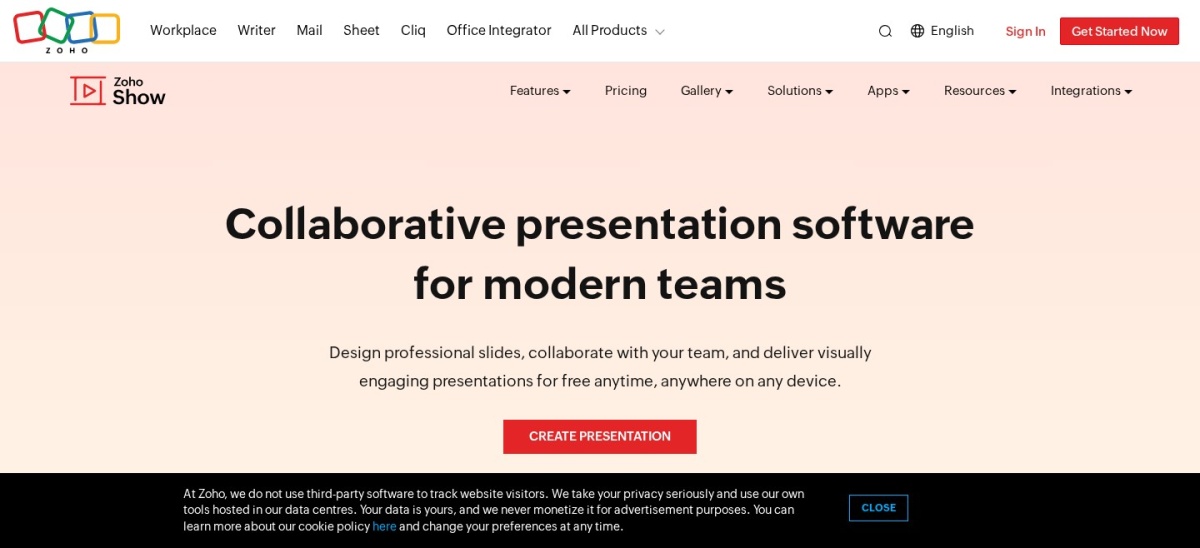
Zoho Show
4.4/5on G2 (63 reviews, checked Nov 2026)
Paid from$2.50/mo
Best low-cost app for Zoho teams
PowerPoint filesImport and export
Free planYes
Desktop appNo, browser only
Paid planProfessional, $2.50/mo
zoho.com
Zoho Show homepage, captured Nov 2026.
Zoho Show is a free browser-based app for building and sharing PowerPoint presentations. It imports and exports .pptx files, supports real-time collaboration and works on any device, with a Professional plan at $2.50 a month billed annually adding team storage and admin controls.
The trade off is polish. Its template library and feature set are smaller than PowerPoint or Google Slides, and there is no desktop app, so you need an internet connection. It suits teams already using Zoho apps who want a simple, low-cost slide tool.
What we like
Free with real-time collaboration
Cheapest paid plan in this list
Works with other Zoho apps
Watch out for
Smaller template library than rivals
No desktop app, needs the internet
Professional adds team storage, folders and admin controlsVisit zoho.com
Free vs paid: what you give up
Free plans cover the basics well. PowerPoint on the web, Google Slides, Keynote and Zoho Show all let you build and share decks for nothing.
Paid plans mostly add export, branding and storage. Canva Pro, Gamma Plus and Visme Starter unlock downloads, premium templates and larger libraries.
If you present for work every week, a paid plan often pays for itself in saved time. If you make a deck once a quarter, a free plan plus PowerPoint on the web is enough.
How we chose
We started from the best-known presentation apps that open or export PowerPoint files, then kept nine with a public rating and a published price.
Prices come from each vendor's pricing page, checked on 25 November 2026. Ratings and review counts come from G2 on the same day. Where a vendor shows a sale, the list shows the regular price.
We left out apps with no public rating and apps that do not export to PowerPoint. No vendor paid for a place, and we do not claim to have used these tools ourselves.
How to choose an app for PowerPoint presentations
Start with the format your audience uses, then match the app to how often you present.
Check how the deck will be shared. If the audience opens .pptx files, pick a native editor or an app with clean PowerPoint export.
Count how often you present. Weekly presenters gain most from a paid plan; occasional presenters can stay on a free plan.
Test one real deck before paying. Import a deck with charts and fonts, export it again, and check what changed.
Pick the AI option only if you edit the draft. AI builders save time on a first draft, but facts and layout still need a human check.
FAQ
What is the best app for PowerPoint presentations?
Microsoft PowerPoint is the best app for most people, because it edits native .pptx files with no conversion and is rated 4.6 out of 5 from 4,404 G2 reviews. Canva is the better pick for fast designed decks, and Google Slides is best for free team editing.
Is there a free app for PowerPoint presentations?
Yes. Google Slides, Keynote and Zoho Show are free, and PowerPoint has a free web version with 5 GB of storage. Free plans cover basic decks well, but downloads, PowerPoint export and branding are often paid features.
Can Google Slides open PowerPoint files?
Yes, Google Slides opens .pptx files and exports back to PowerPoint format. Some charts, fonts and effects can change in the move, so check a complex deck before you rely on it for a live talk.
Which app is best for AI presentations?
Beautiful.ai is the strongest AI pick for polished slides, with layouts that stay aligned as you edit, while Gamma is the cheapest AI option at $9 a month billed annually. Both build a first draft from a prompt that still needs a human edit.
Is Canva good for PowerPoint presentations?
Yes, Canva is good for fast, good-looking decks thanks to its templates and stock assets. It exports to PowerPoint, but complex charts and precise formatting can shift on export, so check the file before presenting.
What is the cheapest paid app in this list?
Zoho Show Professional is the cheapest paid plan here at $2.50 a month billed annually, or $30 a year. Prezi Standard and Google Workspace Starter both cost $7 a month billed annually, while Gamma Plus costs $9 a month.
SaaS SEO and WordPress specialist with about 8 years of experience. Rakib compares WordPress plugins, themes, hosting and software using public pricing, documentation and user reviews. See how we rank.